
In recent years, more and more creative people seem to be moving away from social media and share their work on their own websites or create their own blogs. Despite a few controversies, Substack has been one of the platforms benefitting from that shift, and it has welcomed many creatives and experts who are now writing there and sending their articles to their subscribers via newsletters. I have myself subscribed to a growing number of these newsletters on topics I care about, ranging from design to AI, especially about the impact AI has on creative and professional worlds.
At first, I really enjoyed receiving these newsletters straight into my inbox, without having to connect to a social media platform where I might end up spending more time scrolling than reading about the subjects that matter to me. But very quickly, dozens of long, unread emails started accumulating in my inbox. Some of these pieces were excellent, some not worth the time, but there was no way to know without reading them. So very quickly, I realised that I needed a filter, because my time and attention are finite. After all, this was still a content I had chosen to receive.
Zero inbox, zero patience
I've always done a lot of active monitoring, which I see as a deliberate practice, as opposed to the passive consumption that happens with social media. And since I switched from Gmail to Proton Mail, I've also adopted a zero-inbox policy: every email is read and then either archived or deleted. The accumulation of newsletters, as interesting as they may be, disrupted this digital hygiene. And neither my free time nor my assimilation capacity scales with my subscriptions.
As I was reading about AI automation through these very newsletters, something suddenly clicked: I realised that I could, actually, automate the filtering of this weekly backlog of newsletters via AI. Why not put into practice what I read about, rather than just reading about it? I've never really been into task automation before, so that was a totally new territory for me, and not a well-worn practice. But if it worked, I would immediately see the benefits of it.
So the idea was to use a local LLM to summarise incoming newsletters so I could triage by relevance without having to read everything in full. Why local? Because I already had a local LLM working on my machine thanks to my previous Icelandic Grammar Teacher project - that would imply zero ongoing cost, no API dependency, and no data leaving my machine. The task had value for me personally, but not enough added value at scale to justify paying per API call.
Technical implementation
The email export layer
Ahead of the project, all the newsletters are automatically filtered to a specific folder in my mailbox as soon as they are received. However, as Proton Mail has no public API, accessing the emails required finding a workaround: export_emails.py connects to Proton Mail via Proton Bridge, a desktop app that exposes the Proton mailbox as a local IMAP server on 127.0.0.1:1143, making it accessible via standard imaplib. The export is idempotent, meaning that each .eml file is named YYYY-MM-DD_subject.eml and the script skips files that already exist, so running it twice produces no duplicates. Credentials are managed via .env + python-dotenv, with a CLI fallback.
The summarisation pipeline
Each .eml file is parsed with the email library. Extraction prioritises text/plain and falls back to text/html parsed with BeautifulSoup: only semantic tags, deduplicated, and stripped of the invisible characters (\u00ad, \u200b) that are injected by Substack/Mailgun. The text is truncated to ~1500–2000 characters before being sent to Ollama's REST API (/api/generate). Enough to summarise, but not enough to overwhelm the model.
The part I found really interesting is the language detection. This is handled without any external library: the script counts French-language stopwords (function words like "à", "de", "le", "la", "les", "sur"...) against total word count. If French keywords exceed 8% of the text, the newsletter is treated as French and a dedicated French-language prompt is used, otherwise the English prompt applies. Two distinct prompts, not one bilingual one. The French prompt includes few-shot examples specifically to prevent anglicisms: without them, the model tended to mirror the style and phrasing of the English source text even when writing in French.
A notable debugging moment is worth mentioning: an early version used a stop token (a double line break) to signal the end of the expected output. In practice, this caused summaries to be cut off mid-paragraph whenever the model naturally produced a blank line... which it did often. Removing the stop token, combined with setting num_predict: 600 and temperature: 0.2, stabilised the output length and quality.
Summaries are grouped by theme and each theme is attributed by keyword matching across sender, subject, summary, with fallback on the summary alone when the subject line is opaque. So far the efficacy of this technique has been a bit inconsistent, but I didn't want to attribute the themes through senders names only, as that wouldn't make the app scalable.
The Flask interface and remote access
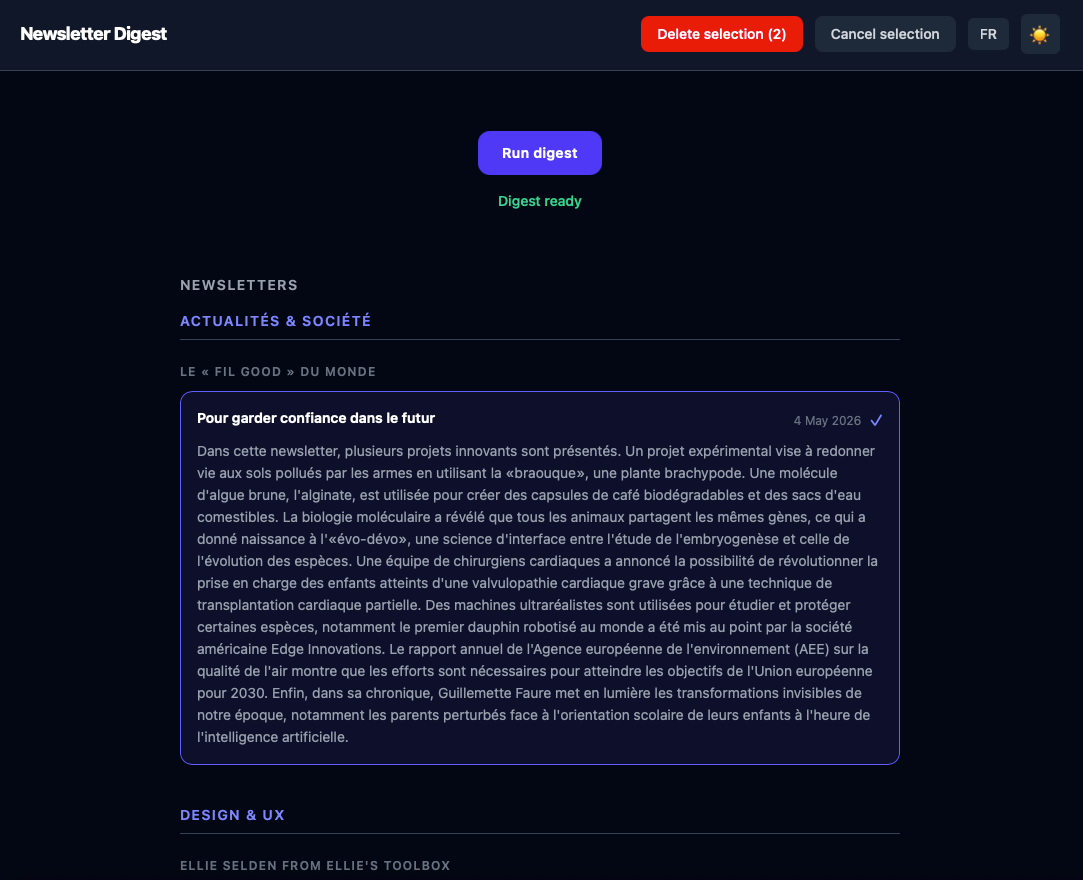
The output is a simple HTML page, organised by theme → sender → chronological cards; a Flask server wraps the pipeline. This simple web interface allows me to trigger a summarisation run via a button, display real-time logs, and navigate directly to the generated HTML output.
The app runs on my Mac Mini at home and is accessible remotely via Tailscale, a VPN tool that creates a private, encrypted network between your devices without requiring port forwarding or router configuration. In practice: the Mac Mini and the phone are on the same Tailscale network, regardless of physical location, which means the Flask interface is reachable from anywhere as if it were local.
Once a summarisation run completes, a push notification is sent via ntfy, a lightweight, open-source notification service. A dedicated topic is set up on the public ntfy.sh server; the Flask backend sends an HTTP POST request to that topic when the pipeline finishes, and the ntfy mobile app receives it instantly. In practice, this means triggering a run, putting the phone down, and being notified when the digest is ready. Without polling, without checking logs, without staying in front of a screen while mistral:7b works through a few dozen newsletters
It is also possible to delete low-interest newsletters directly from the interface, so when I open my inbox the selection matches the digest and I know that all the messages in there are only those I'm interested in.
What comes next
The app has been part of my daily routine for a while now, and that alone feels like a meaningful result. I use it almost every day (or at least every time a new batch of newsletters arrives) and the core loop works exactly as intended: trigger a run, wait for the ntfy notification, open the digest, decide what is worth reading. The ability to do this remotely, away from home, without touching my inbox directly, is something I did not fully anticipate appreciating as much as I do.
The quality of the summaries is functional, but honest assessment requires acknowledging the gap. mistral:7b does the job of triage reasonably well. It does not do it as well as a more capable model would - I know this because I ran the same newsletters through Claude early on, and the difference was not subtle. Some of that gap is a model capability issue; some of it is prompt engineering, which turned out to matter more than I expected.
This was also my first serious attempt at task automation. The learning curve was real, but the constraints (hardware limits, Proton Mail's lack of a public API, the peculiarities of working with a local LLM) produced decisions that I think made the project more interesting, not less.
The project will be published as open source, as all my personal work is. The choice of ntfy fits naturally into that philosophy: it is itself open-source and can be self-hosted, which means a future migration to a home server could include a private ntfy instance: no dependency on a public service, no data leaving the local network. A friend I told about the project expressed immediate interest, but she uses a different email provider. Which points to the most obvious next step: a multi-provider connection mode, so the pipeline is not tied to Proton Bridge specifically.
There is a larger question hovering over all of this, one I am not sure I can answer yet. I spend a considerable amount of time reading about the ways artificial intelligence is disrupting creative work: displacing writers, devaluing craft, accelerating a kind of flattening of the things that make writing worth reading. And yet here I am, using a language model to help me decide which writers are worth reading this week. I find the tension genuinely uncomfortable. I do not think it resolves neatly. But I think it is worth naming, rather than pretending it is not there.
Link to the GitHub project